📹 Animation Observables
Available Since 0.0.39
Table of content:
Introduction
This page describes a set of animation-based observable implementations based on the Observable and Observer interfaces. These are useful for reactive and animated UI elements, such as fading or blinking text, typewriter-style effects, and interpolated values.
All classes implement the standard Observable<T> interface and update automatically using an Observable<Instant> time source.
Overview
Each animation implementation provides a different visual behavior:
Class Name | Description |
|---|---|
Fades text in and out with a blinking effect at the end. | |
Fades text in and out symmetrically, with hold times at the start and end. | |
Animates text like a typewriter. | |
Smoothly interpolates numeric values over a fixed duration. |
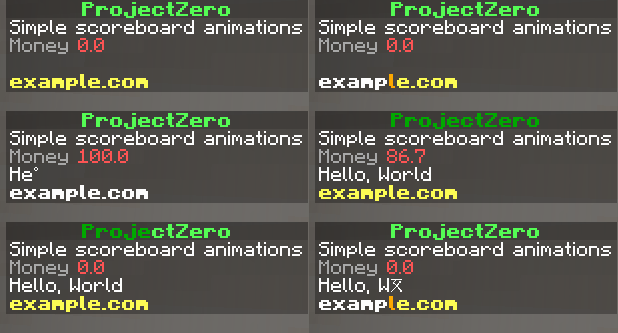
Usage & Showcase
Advantages
Animation observables provide a declarative and reactive approach to building time-based UI transitions. Below are some of the key advantages:
🔁 Continuous Reactivity
All animations automatically update based on their dependencies (Observable<String>, Observable<Instant>, etc.), without manual ticking or recomputation. This ensures a clean separation between logic and time-based rendering.
🧩 Composable Animations
Each animation is implemented as a self-contained observable that can be easily composed with others, enabling layered effects like fading + blinking or typing + styling.
⚙️ Configurable Behavior
Animations like FadingColorBlinkObservable, FadingColorInOutObservable, and TypingObservable expose parameters such as characterDelay, blinkTimes, and writingSpeedPerCharacter, allowing fine-grained control over timing and styling.
🎨 Style Interpolation
Visual transitions are achieved using styled Components and helper functions like AnimationHelpers.fading, enabling smooth color blending and appearance effects.
🔄 State API Integration
Because all animation classes implement Observable<T> and Observer, they seamlessly plug into the state-based update mechanism, propagating changes downstream efficiently.
🧪 Predictable & Testable
Deterministic behavior based on time and text input makes these animations easy to simulate, debug, and verify in tests.
⏱️ Time-Based Synchronization
By using Observable<Instant> for time tracking, all animations can remain in sync with a global clock or custom scheduler, supporting coordinated animations across components.